
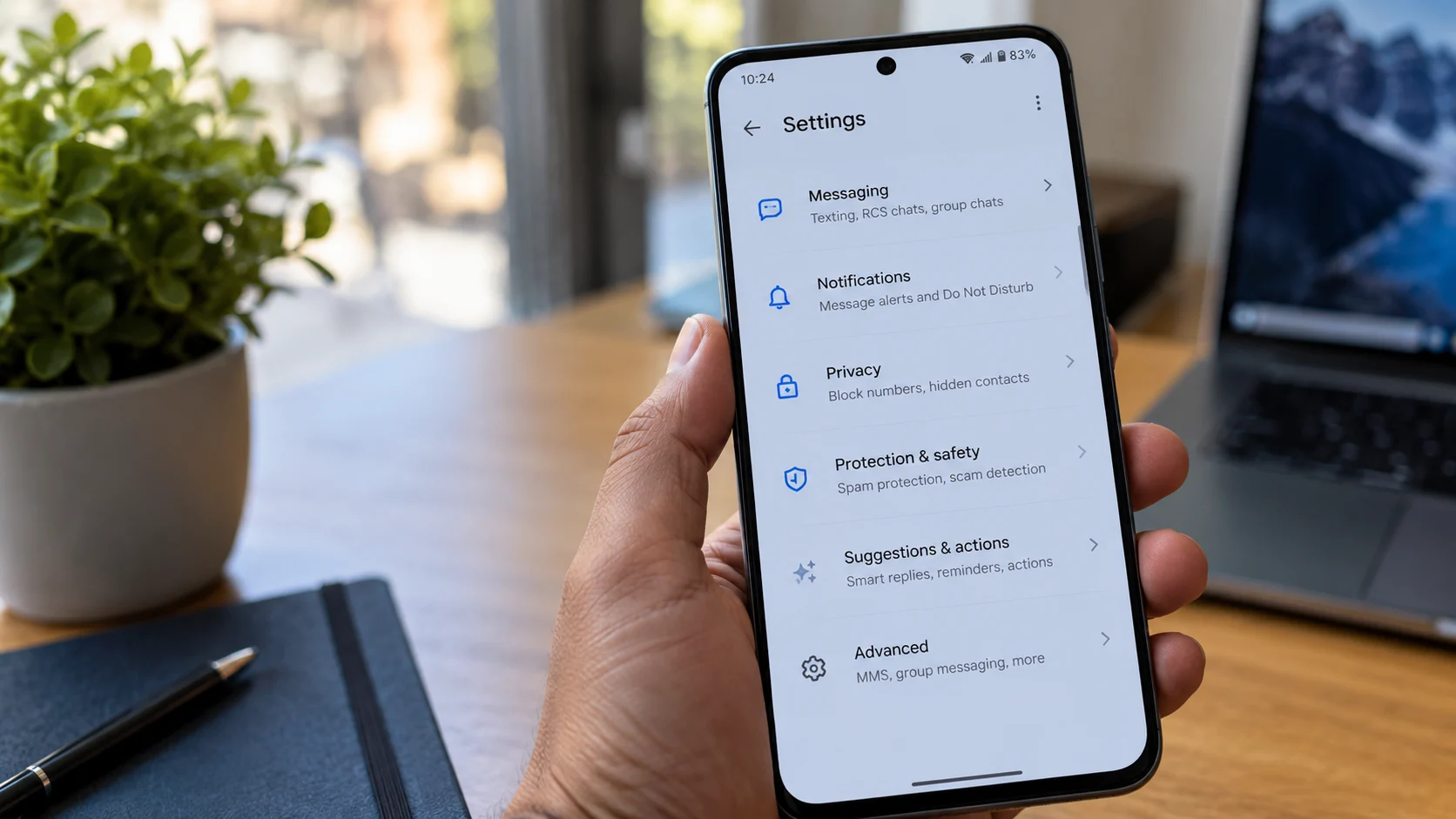
Google appears to be preparing a major reorganization of the Google Messages settings menu, with a redesigned interface intended to make important options easier to find. The changes were spotted in a recent beta build of the Android messaging app, suggesting that Google is exploring a more structured approach to organizing its growing list of features.
The proposed redesign separates settings into clearer categories instead of presenting users with one lengthy list of options. The updated interface also introduces visual changes to several individual settings pages, including new illustrations for some features.
However, the revamped settings menu remains a work in progress. Google has not announced an official release date, and the final design could change before a wider rollout.
Google Messages Settings Could Get a More Organized Layout
The current Google Messages settings menu includes options related to RCS chats, notifications, conversation preferences, privacy, and other features. Finding a specific control can require scrolling through multiple sections, particularly as Google continues to expand the app’s capabilities.
The interface spotted in the beta build takes a more organized approach, grouping related settings into dedicated sections. The goal appears to be making the app easier to navigate without requiring users to search through an increasingly crowded menu.
The redesigned layout was identified in a Google Messages beta build dated October 20, 2026. Because the findings come from an examination of in-development software, they should not be treated as confirmation that every proposed change will reach the public version.
Messaging, Privacy and Protection Settings May Be Separated
One of the most noticeable changes involves the way Google organizes messaging-related controls. The proposed Messaging section brings together options previously associated with RCS chats and divides them into more manageable groups. A dedicated page for SIM information and country settings has also appeared in the redesigned interface.
Privacy controls are receiving a clearer organizational structure as well. The redesigned pages include options for managing profiles, read receipts, and typing indicators. Keeping these controls together could help users find conversation privacy preferences more quickly.
Spam-related controls are also part of the changes. The interface uses labels such as Protection & Safety and Spam & Safety in different places, suggesting that Google may still be refining the naming and organization of these sections.
These changes could become particularly relevant as Google continues to expand its spam and scam protection features. However, the proposed settings layout should be distinguished from individual security features that Google releases separately.
New Illustrations Could Refresh Individual Settings Pages
The menu reorganization is not limited to moving options into different categories. Several individual settings pages appear to be receiving updated visuals, including artwork associated with Gemini and Suggestions & Actions.
These illustrations could help users understand what particular options do before opening or changing them. Other pages, however, still appear relatively sparse, with limited text and substantial empty space. The inconsistent presentation indicates that the redesign may not be finished.
Google may continue adjusting the layout, section names, and visual elements as development progresses. Some labels observed in the test interface do not consistently match the names of the menu items used to open those pages, another indication that the current implementation is unfinished.
How the Settings Redesign Differs From the New Message Action Menu
Google Messages has also introduced a separate redesign for the menu that appears when users press and hold a message. That interface places commonly used actions in a floating menu near the selected message rather than relying on the previous toolbar and overflow menu arrangement.
The updated message action menu includes options such as Reply, Forward, Copy, Star, Delete, Select more, and Info, with additional actions available for supported media. It also supports selecting and copying a specific portion of a text message instead of copying the entire message.
That message-level redesign is separate from the settings reorganization currently being explored in beta. The former changes how users interact with individual conversations, while the newer settings experiment focuses on making app preferences easier to locate.
When Will the New Google Messages Menu Arrive?
As of October 25, 2026, Google has not announced a public release date for the reorganized settings menu. The changes have been identified in beta software, and there is no confirmed timetable for their arrival in the stable version of Google Messages.
Users should therefore not assume that the redesigned settings interface is already available to everyone. Google could introduce it gradually, make further adjustments during testing, or change the final layout before release.
For now, the planned reorganization indicates that Google is continuing to refine the Messages experience as the app gains additional communication, privacy, and security capabilities. If the redesigned menu reaches a wider audience, its clearer categories could make everyday settings easier to find without fundamentally changing how users send and receive messages.